
- How-to create a Git bare repository in Raspberry PI with Ansible and call as module in Terraform
- Make the playbook
- Extras
- Documentation sources
How-to create a Git bare repository in Raspberry PI with Ansible and call as module in Terraform
Doing my practices with #Terraform I have found myself with the need to create a bare #git repository that if one for the modules, if another for the stage environment, if prod…
Obviously I could follow the book’s recommendations and not “complicate” creating the repos on GitHub, but why do it when I already have my own local server where I already have my test repositories? and obviously if I have to do the task of creating a bare git repository more than once, why not add a little more grace to the matter and automate its creation with #Ansible?
Surely there are better ways to create a bare git repo, after investigating the official Ansible modules documentation I have not found it and we are talking about creating some repositories to test and break with Terraform.
Make the playbook
Therefore, for this task it is better to create a playbook quickly and not waste more time than it takes to connect by ssh to the local server and execute 1 command, and that is the objective of the playbook that I present below, take it as if it were a draft:
---
- name: "Create git bare repo"
  hosts: <remote_machine_ansible_alias>
  vars:
    git_repo_name: "<name_of_your_repo>"
    git_base_path: "/remote_path/GIT/REPOS/base/path"
    git_repo_path: "/.git"
    git_system_user: "<username_owner_of_git_dir>"
    git_system_group: "<groupname_owner_of_git_dir>"

  tasks:
    - name: "Ensuring that the [] directory exists and has the correct permissions"
      # https://docs.ansible.com/ansible/2.9/modules/file_module.html
      file:
        dest: ""
        owner: ""
        group: ""
        # 1000 sticky bit + 2000 SGID = 3 special bit in octal.
        # 0 before, to directly use octal notation:
        # +info: https://docs.ansible.com/ansible/2.9/modules/file_module.html#parameter-mode
        mode: 03775
        state: directory

    - name: "Get stat from subdirectory hooks in []"
      stat:
        # Bare git repository most have a hooks directory defined:
        path: "/hooks"
      register: path_stat

    - name: "Init git bare repository if [] not contains subdirectory hooks"
      command: "git init --bare "
      register: "repo_creation"
      when:
        - (path_stat is defined)
        - (path_stat.stat.exists is false)

    - name: "Get stat of  directory"
      # https://docs.ansible.com/ansible/2.9/modules/stat_module.html
      stat:
        path: ""
      register: stat_git_repo_path

    - name: "Show git_repo_path if exists"
      debug:
        msg:
          - "You can add this remote repository to your git project with:"
          - "git remote add < "origin" | > ssh://@:"
      when: stat_git_repo_path.stat.path is defined
Example of above code:
---
- name: "Create git bare repo"
  hosts: raspberrypi
  vars:
    git_repo_name: "Chapter_4_hello_linkedin"
    git_base_path: "/SATA/GIT/REPOS/TERRAFORM_UP_AND_RUNNING_REPOS"
    git_repo_path: "/.git"
    git_system_user: "deliodc"
    git_system_group: "deliodc"

  tasks:
    - name: "Ensuring that the [] directory exists and has the correct permissions"
      # https://docs.ansible.com/ansible/2.9/modules/file_module.html
      # To change the owner and group we need privilegies:
      become: yes
      file:
        dest: ""
        owner: ""
        group: ""
        # 1000 sticky bit + 2000 SGID = 3 special bit in octal.
        # 0 before, to directly use octal notation:
        # +info: https://docs.ansible.com/ansible/2.9/modules/file_module.html#parameter-mode
        mode: 03775
        state: directory

    - name: "Get stat from subdirectory hooks in []"
      stat:
        path: "/hooks"
      register: path_stat

    - name: "Init git bare repository if [] not contains subdirectory hooks"
      become: yes
      command: "git init --bare "
      register: "repo_creation"
      when:
        - (path_stat is defined)
        - (path_stat.stat.exists is false)

    - name: "Get stat of  directory"
      # https://docs.ansible.com/ansible/2.9/modules/stat_module.html
      stat:
        path: ""
      register: stat_git_repo_path

    - name: "Show git_repo_path if exists"
      debug:
        msg:
          - "You can add this remote repository to your git project with:"
          - "git remote add  ssh://@:"

      when: stat_git_repo_path.stat.path is defined
Execution example
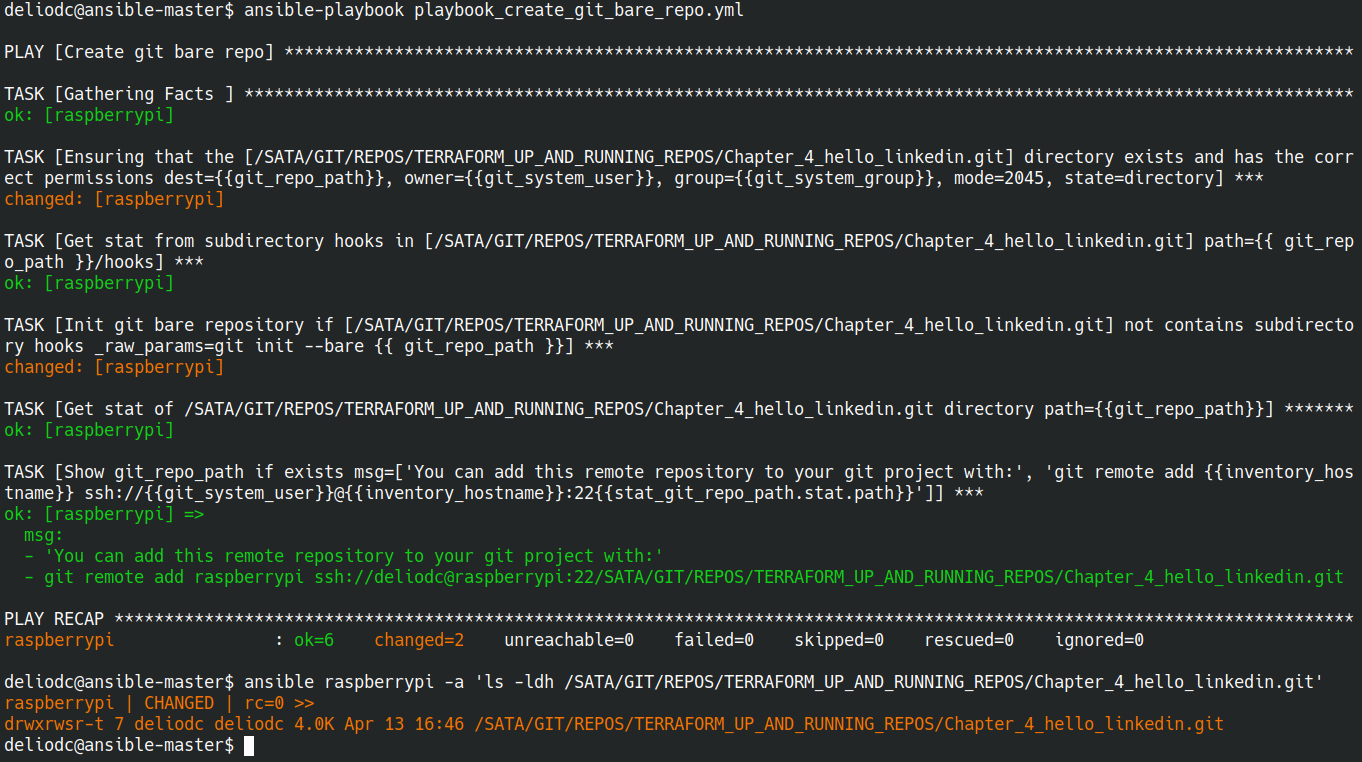
Of course you can edit the debug task “Show git_repo_path if exists” string, and indicate “origin” or another repository name what you like.
And yes, in the /etc/hosts file in my ansible controller host exists a entry with the raspberrypi host with the local ip address defined.
Extras
Add your remote git repo to your terraform proyect
If you want to add the local network repository to your terraform code, you can add the source parameter to your module call:
Official Terraform module sources documentation
In this case the string to define the remote git repository with reference a repo tag most be something like:
source = "git::ssh://deliodc@raspberrypi:22/SATA/GIT/REPOS/TERRAFORM_UP_AND_RUNNING_REPOS/Chapter_4_hello_linkedin.git//services/webserver-cluster?ref=v0.0.2"
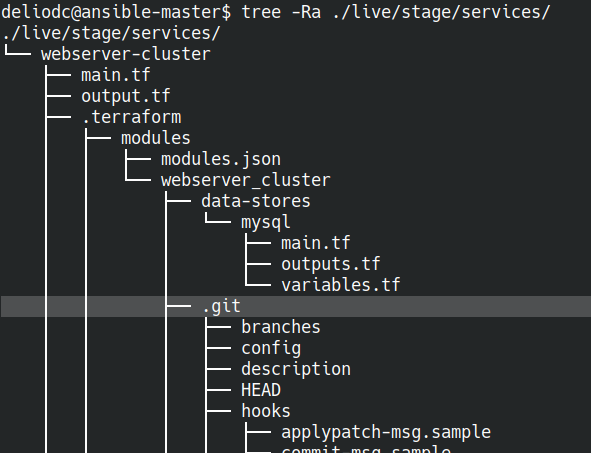
When you update your module call with “terraform init”, terraform goes to clone the remote repository to your .terraform directory:
Documentation sources
Official git documentation about bare repositories
Official ansible used modules documentation
Everything is possible if you have the necessary patience and perseverance 😉
